Expand your world with Wolfram’s science.
Expand your world with Wolfram’s science.
Wind tunnels are known as the “cradle of aerospace vehicles” and are regarded as important strategic resources by countries around the world.
For finite element applications, Computational Fluid Dynamics (CFD) can complement or possibly replace the use of wind tunnels.
In the following, according to the five “M” (Machine, Mesh,Method,Mechanism and Mapping) CFD content framework summarized by Academician Zhang Hanxin (张涵信)[1], sir Chen shares his process and results of using computational fluid dynamics to conduct 3D space shuttle “numerical wind tunnel” experiment.
For finite element applications, Computational Fluid Dynamics (CFD) can complement or possibly replace the use of wind tunnels.
In the following, according to the five “M” (Machine, Mesh,Method,Mechanism and Mapping) CFD content framework summarized by Academician Zhang Hanxin (张涵信)[1], sir Chen shares his process and results of using computational fluid dynamics to conduct 3D space shuttle “numerical wind tunnel” experiment.
1. Wind tunnel and aircraft design and experimental conditions control process
1. Wind tunnel and aircraft design and experimental conditions control process
LoadthefiniteelementandOpenCascadeLinksoftwarepackages:
In[]:=
Needs["NDSolve`FEM`"]Needs["OpenCascadeLink`"]
1.1 Experimental aircraft.
1.1 Experimental aircraft.
Based on the prototype of the Space Shuttle Columbia, which was first launched by NASA on April 12, 1981, the vehicle model for the design of this experiment (composed of 616 triangles) :
Based on the prototype of the Space Shuttle Columbia, which was first launched by NASA on April 12, 1981, the vehicle model for the design of this experiment (composed of 616 triangles) :
In[]:=
dg=DiscretizeGraphics[ExampleData[{"Geometry3D","SpaceShuttle"}]];Graphics3D[{Opacity[1],dg},BoxedFalse,ImageSize250]
Out[]=

1.2 A circular wind tunnel was used in the experiment.
1.2 A circular wind tunnel was used in the experiment.
Due to the viscous effect, the cross section of the wind tunnel is usually round rather than square, because the corner flow of the square wind tunnel shrinks more, resulting in flow disturbance. Circular wind tunnels flow more smoothly.
Due to the viscous effect, the cross section of the wind tunnel is usually round rather than square, because the corner flow of the square wind tunnel shrinks more, resulting in flow disturbance. Circular wind tunnels flow more smoothly.
In[]:=
Graphics3D[{Opacity[1],Cylinder[{{-12,0,0},{12,0,0}},6]},BoxedFalse,ImageSize250]
Out[]=

1.3 Put the craft in a circular wind tunnel.
1.3 Put the craft in a circular wind tunnel.
In[]:=
cyl=OpenCascadeShape[Cylinder[{{-12,0,0},{12,0,0}},6]];orbiter=OpenCascadeShape[ToBoundaryMesh[dg]];shape=OpenCascadeShapeDifference[cyl,orbiter];bmesh=OpenCascadeShapeSurfaceMeshToBoundaryMesh[shape];bmesh["Wireframe"];Show[bmesh["Wireframe"["MeshElementStyle"Directive[FaceForm[Opacity[0.25]],EdgeForm[]]]],Graphics3D[{Opacity[1],dg}],ImageSize300]
Out[]=

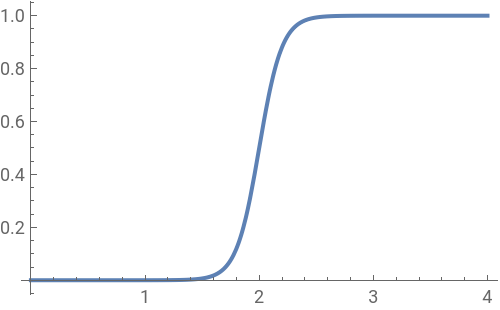
1.4 Sets a function to accelerate the wind tunnel inflow rate.
1.4 Sets a function to accelerate the wind tunnel inflow rate.
In[]:=
ramp=Function[t,Exp[10*t]/(Exp[20]+Exp[10*t])];Plot[ramp[t],{t,0,4},ImageSize250]
Out[]=
1.5 Set the wind tunnel inflow profile.
1.5 Set the wind tunnel inflow profile.
In[]:=
radius=6;flowProfile[y_,z_]:=-(y^2/radius^2+z^2/radius^2)+1;Plot3D[flowProfile[y,z],{y,z}∈Disk[{0,0},radius],ImageSize250]
Out[]=

1.6 Set the inflow boundary conditions at the top of the wind tunnel.
1.6 Set the inflow boundary conditions at the top of the wind tunnel.
In[]:=
velocity=3/4;inflowBC=DirichletCondition[{u[t,x,y,z]ramp[t]*velocity*flowProfile[y,z],v[t,x,y,z]0,w[t,x,y,z]0},x-12];
1.7 Set the outflow boundary conditions on the right side of the wind tunnel.
1.7 Set the outflow boundary conditions on the right side of the wind tunnel.
In[]:=
outflowBC=DirichletCondition[p[t,x,y,z]0,x12];
1.8 No slip boundary conditions are set on the remaining faces of the wind tunnel.
1.8 No slip boundary conditions are set on the remaining faces of the wind tunnel.
In[]:=
wallBC=DirichletCondition[{u[t,x,y,z]0,v[t,x,y,z]0,w[t,x,y,z]0},x≠-12&&x≠12];
1.9 Combine boundary conditions together.
1.9 Combine boundary conditions together.
In[]:=
bcs={inflowBC,outflowBC,wallBC};
1.10 Set the initial conditions so that the system is at rest.
1.10 Set the initial conditions so that the system is at rest.
In[]:=
ic={u[0,x,y,z]0,v[0,x,y,z]0,w[0,x,y,z]0,p[0,x,y,z]0};
2. Experimental method
2. Experimental method
The experimental methods mainly include: Mesh, that is, computational mesh, mesh division is the basis and premise of the whole numerical calculation; Method, that is, the calculation method, the solution of fluid mechanics governing equations.
2.1 Generate complete element meshes for wind tunnel and 3D space shuttle models.
2.1 Generate complete element meshes for wind tunnel and 3D space shuttle models.
In[]:=
mesh=ToElementMesh[bmesh];mesh["Wireframe"]
Out[]=

2.2 Set up the Navier- Stokes equations.
2.2 Set up the Navier- Stokes equations.
In[]:=
pde=FluidFlowPDEComponent[{{u[t,x,y,z],v[t,x,y,z],w[t,x,y,z],p[t,x,y,z]},t,{x,y,z}},<|"ReynoldsNumber"->9000000000000000|>]{0,0,0,0};
2.3 Monitor the solution process and measure the time required to solve the Navier- Stokes equations.
2.3 Monitor the solution process and measure the time required to solve the Navier- Stokes equations.
In[]:=
Monitor[AbsoluteTiming[{xVel,yVel,zVel,pressure}=NDSolveValue[{pde,bcs,ic},{u,v,w,p},{x,y,z}∈mesh,{t,0,1.05},Method{"TimeIntegration"{"IDA","MaxDifferenceOrder"2,"ImplicitSolver"->{"Newton","LinearSolveMethod"->"Multifrontal"}},"PDEDiscretization"{"MethodOfLines","DifferentiateBoundaryConditions"True,"SpatialDiscretization"{"FiniteElement","InterpolationOrder"{u2,w2,p1}}}},EvaluationMonitor(currentTime=Row[{"t = ",CForm[t]}])];],currentTime]
Out[]=
{877.519,Null}
3. Experimental results
3. Experimental results
The experimental results mainly include: Mapping, which means flow display. The calculation results are presented in static and dynamic graphics to facilitate the analysis of flow mechanisms and reveal flow laws.
Mechanism, the ultimate goal of CFD is to obtain the aerodynamic characteristics of the aircraft and the corresponding flow mechanism, which is the flow mechanism.
Mechanism, the ultimate goal of CFD is to obtain the aerodynamic characteristics of the aircraft and the corresponding flow mechanism, which is the flow mechanism.
3.1 3D contour plot for the total velocity magnitude.
3.1 3D contour plot for the total velocity magnitude.
(Because the file is too large to upload, so the animation output results for screenshots. )