Notice: For version 12.2+. There were some changes to StreamPlot[] in V12.1 and V12.2 that were incompatible with my original code. I updated it again in Version 13.0. And I just updated it again for V13.3 to fix a coloring problem that might be bug. In any case, the new version of Tree 1 is now incompatible with older versions of Mathematica. The code for Tree 2 might work in earlier versions, but I cannot test that.
When I started teaching, there was already in place in Calculus I and II at my institution, a “graphing project” using software on the computers in the Computer Lab. I adapted the assignment to multivariable calculus when we got a site license for Mathematica. In it the students were to model a 3D object with equations. Some years ago I started thinking about doing something like that in differential equations, after StreamPlot[] was introduced in Mathematica. Well, it seemed harder, not only to construct a phase flow that looks like something but to get StreamPlot[] to show you everything you want to see. It’s a bit finicky. Then over a winter break, I thought I’d try my hand at making a Christmas tree. An idea for the characteristic zigzag of the outline had occurred to me, and I was curious whether it would look how I imagined it or just be some kind of squiggly mess. Here are two examples I came up with. Each is created with a single vector field and a single StreamPlot[] command; the only things added are some dots for ornaments and in one case a polygon for a star.
Tree 1
Tree 1
Out[]=
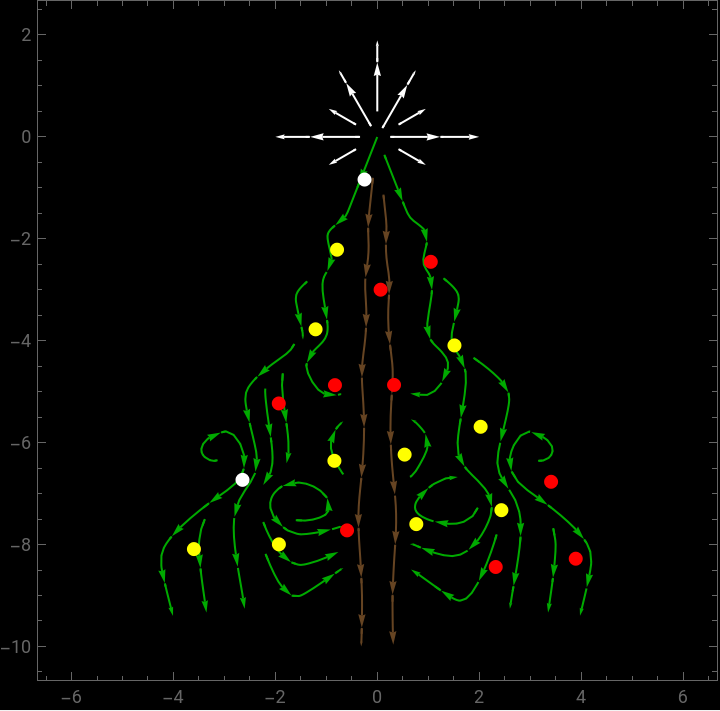
The vector field is made up of piecewise saddle points for the outline of the tree with a strong flow down the middle for the trunk. The pieces of the vector field that make up the tree are scaled by the golden ratio, relative to the vertex of the tree, which is placed at the origin of the coordinate system. The addition of a center at the origin creates the starburst crowning the tree. The stream lines of the vector field are plotted only within a tree-shaped region. Some random points (disks) pose as ornaments hanging on the tree. The process of developing the vector field is very much like the process in “Painting a Selfie Girl, with Maths” on YouTube, https://www.youtube.com/watch?v=8--5LwHRhjk, if you have seen that. Only this is simpler.
Code for Tree 1
Code for Tree 1
(*Takesabout4sectorunandthisshowsarunningtimerwhileyouwait*)PrintTemporary@Dynamic@Clock@Infinity;(*VectorField(it'scomplicated)*)fade[r_]:=UnitTriangle[r^2]^2;SuperStar[{a_,b_}]:=fade[(4(y-b)^2/(1/4+(y-b)^2))((x-a)^2)/2]({x,y}-{a,b});SuperDagger[v_]:=Reverse@v;corner[{a1_,b1_},sc_:1]:=With{a=sc*a1,b=sc*b1},Sign[a]fade[2((x-a)^2+(y-b)^2)/sc^2]RotationTransform[Sign[a](ArcTan[2]-ArcTan[1])]@;layer[n_]:=(corner[{1,-2},GoldenRatio^n]+corner[{-1,-2},GoldenRatio^n])-(corner[{1/2,-2.25},GoldenRatio^n]+corner[{-1/2,-2.25},GoldenRatio^n]);vf[x_,y_]=+Sum[layer[n],{n,0,3}];(*TreeRegion*)branchesReg=y>-9-&&y<0.1`&&y<1-1.8`Abs[x];trunkReg=y<0.1`&&y<1-1.8`Abs[x]&&Abs[x]<0.4`;starReg=+<2;treeReg=Simplify@Or[branchesReg,trunkReg,starReg];treeRFN=Function[{x,y,vs,vy,n},Evaluate@treeReg];(*colorpalette*)tree=Darker@Green;trunk=Darker@Brown;bright=RGBColor[1,1,1];(*theplot*)dom=5;StreamPlot[vf[x,y],{x,-dom-1,dom+1},{y,-2dom,2},StreamStylebright,StreamColorFunctionNone,StreamPoints{{(*branches*){{-1,-2}+0.1{1,2},tree},{{1,-2}+0.01{-1,2},tree},{GoldenRatio{-1,-2}+0.02{1,2},tree},{GoldenRatio{1,-2}+0.02{-1,2},tree},{GoldenRatio{-1,-2}+0.02{2,-1},tree},{GoldenRatio{1,-2}+0.02{-2,1},tree},{GoldenRatio^2{-1,-2}+0.03{1,2},tree},{GoldenRatio^2{1,-2}+0.03{-1,2},tree},{GoldenRatio^3{-1,-2}+0.004{1,2},tree},{GoldenRatio^3{1,-2}+0.04{-1,2},tree},{{-2.2,-5},tree},{{-1.8,-5.5},tree},{{3.5,-8},tree},{{-3.5,-8},tree},{{1.,-6.},tree},{{1.6,-9.1},tree},{{2.,-7.2},tree},{{1.3,-7.5};{0.75,-7.2},tree},{{-1.5,-7.7;-7.8},tree},{{-1.5,-8.4},tree},{{-1.5,-9},tree},{{1.,-8.},tree},{{-0.9,-5.9},tree},(*star*){{0.5`,0.`},bright},{{0.25`,0.4330127018922193`},bright},{{-0.25`,0.4330127018922193`},bright},{{-0.5`,0.`},bright},{{0.4330127018922193`,-0.25`},bright},{{0.4330127018922193`,0.25`},bright},{{0.`,0.5`},bright},{{-0.4330127018922193`,0.25`},bright},{{-0.4330127018922193`,-0.25`},bright},(*trunk*){{-0.3,-9},trunk},{{0.3,-9},trunk},Nothing}},Epilog{(*Ornaments:Everyrunisrandomlydifferent(thinkthecathasbeenatthetreeagain)*)PointSize@Large,{RandomChoice[{Red,Yellow,White}],Point[#]}&/@Complement[MeshCoordinates@#,MeshCoordinates@BoundaryDiscretizeRegion[#]]&[DiscretizeRegion[ImplicitRegion[(y<0.1&&y<1-1.8Abs[x])&&y>-9-Abs[x]/10,{x,y}],MaxCellMeasure1.5]]},RegionFunctiontreeRFN,RegionFillingStyleNone,RegionBoundaryStyleNone,BackgroundBlack]
†
({x,y}-{a,b})
*
{0,0}
Abs[x]
10
2
Abs[x]
2
Abs[y]
Tree 2
Tree 2
Out[]=
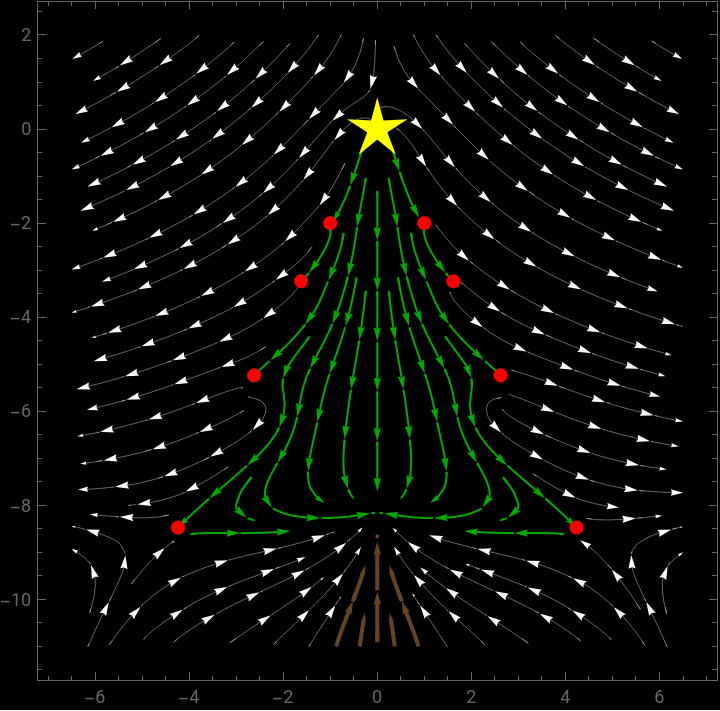
I like Tree 1 above, it’s slight off-symmetry and the trunk running through the tree, but Tree 2 is in a sense purer in that it does not rely on a piecewise construction of the vector field. Again the corners are defined by saddle points, scaled by the golden ratio relative to the vertex of the tree and highlighted with a red ornament. The vertex of the tree is created by a center (two positive eigenvalues), and a similar center is placed below the image to create the flow that defines the trunk. By symmetry (and luck? and the position of the lower center), there is a center with two negative eigenvalues between the vertex of the tree and the lower center.
Another neat feature is that the vector field outside the tree is just a continuation of the vector field that defines the tree. The only difference in the image is how the stream lines are colored. The ones outside the tree are colored white and can be viewed as snow falling. The complete vector field is just an interpolation of linear vector fields, where the interpolation nodes are just the critical points of the vector fields. The beauty of the mathematics and the beauty of the image go hand in hand, and that is just outstanding to me.
Another neat feature is that the vector field outside the tree is just a continuation of the vector field that defines the tree. The only difference in the image is how the stream lines are colored. The ones outside the tree are colored white and can be viewed as snow falling. The complete vector field is just an interpolation of linear vector fields, where the interpolation nodes are just the critical points of the vector fields. The beauty of the mathematics and the beauty of the image go hand in hand, and that is just outstanding to me.
Code for Tree 2
Code for Tree 2
Extras
Extras
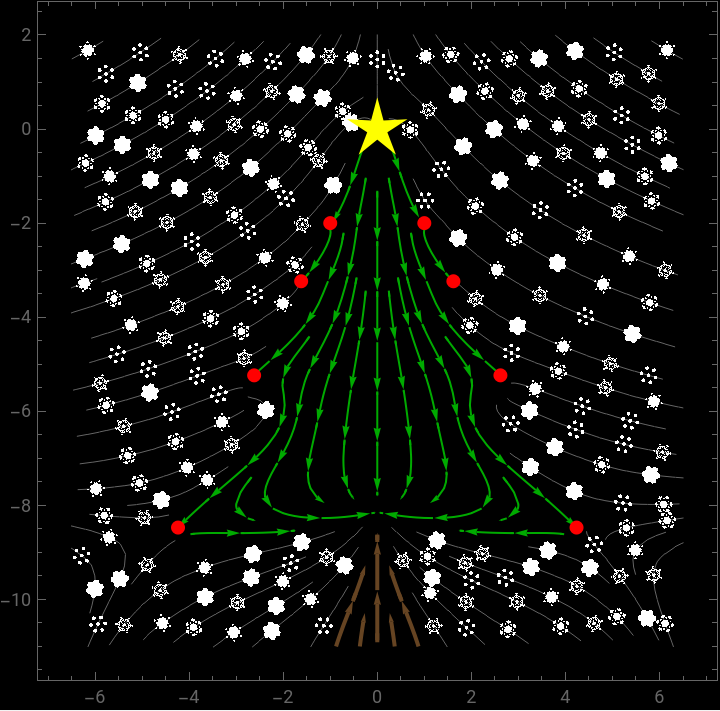
Below are versions of Tree 2 enhanced by replacing the arrow heads of the white flow lines with snowflakes, or with fancy snowflakes the code for which I borrowed from Silvia on StackExchange. One can animate the snowflakes to make snow flurries.
Out[]=
With simple snowflakes
With simple snowflakes
We change the arrowheads to snowflakes.
Phase flow = snow flurries
Phase flow = snow flurries
Execute the following to see the phase flow animated outside the christmas tree (just the snowflakes). Note the velocities depend on the length of the arrow, not the phase the velocity.
The following animated plot perturbs the velocities along each flow line so that the pattern of the snow flurry evolves over time.
Fancy Snowflakes code (borrowed)
Fancy Snowflakes code (borrowed)
Code from @Silvia at https://mathematica.stackexchange.com/a/39368/4999
With snowflake arrow heads (needs Fancy Snowflakes code)
With snowflake arrow heads (needs Fancy Snowflakes code)
Be sure to execute the code in the previous section before running the code below.
Dynamic (self-animated) snow flurries:
CITE THIS NOTEBOOK
CITE THIS NOTEBOOK
Drawing with differential equations (Christmas trees)
by Michael Rogers
Wolfram Community, STAFF PICKS, December 16, 2023
https://community.wolfram.com/groups/-/m/t/3085435
by Michael Rogers
Wolfram Community, STAFF PICKS, December 16, 2023
https://community.wolfram.com/groups/-/m/t/3085435