Introduction
Introduction
In this notebook we show how to obtain crypto-currencies data from several data sources and make some basic time series visualizations. We assume the described data acquisition workflow is useful for doing more detailed (exploratory) analysis.
There are multiple crypto-currencies data sources, but a small proportion of them give a convenient way of extracting crypto-currencies data automatically. I found the easiest to work with to be https://finance.yahoo.com/cryptocurrencies, [YF1]. Another easy to work with Bitcoin-only data source is https://data.bitcoinity.org , [DBO1].
Remark: The code below is made with certain ad-hoc inductive reasoning that brought meaningful results. This means the code has to be changed if the underlying data organization in [YF1, DBO1] is changed.
Yahoo! Finance
Yahoo! Finance
Getting cryptocurrencies symbols and summaries
Getting cryptocurrencies symbols and summaries
In this section we get all crypto-currencies symbols and related metadata.
Get the data of all crypto-currencies in [YF1]:
In[]:=
AbsoluteTiming[lsData=Import["https://finance.yahoo.com/cryptocurrencies","Data"];]
Out[]=
{6.18067,Null}
Locate the data:
In[]:=
pos=First@Position[lsData,{"Symbol","Name","Price (Intraday)","Change","% Change",___}];dsCryptoCurrenciesColumnNames=lsData〚Sequence@@pos〛Length[dsCryptoCurrenciesColumnNames]
Out[]=
{Symbol,Name,Price (Intraday),Change,% Change,Market Cap,Volume in Currency (Since 0:00 UTC),Volume in Currency (24Hr),Total Volume All Currencies (24Hr),Circulating Supply,52 Week Range,1 Day Chart}
Out[]=
12
Get the data:
In[]:=
dsCryptoCurrencies=lsData〚Sequence@@Append[Most[pos],2]〛;Dimensions[dsCryptoCurrencies]
Out[]=
{25,10}
Make a dataset:
In[]:=
dsCryptoCurrencies=Dataset[dsCryptoCurrencies][All,AssociationThread[dsCryptoCurrenciesColumnNames〚1;;-3〛,#]&]
Out[]=


Get all time series
Get all time series
In this section we get all the crypto-currencies time series from [YF1].
In[]:=
AbsoluteTiming[ccNow=Round@AbsoluteTime[Date[]]-AbsoluteTime[{1970,1,1,0,0,0}];aCryptoCurrenciesDataRaw=Association@Map[#->ResourceFunction["ImportCSVToDataset"]["https://query1.finance.yahoo.com/v7/finance/download/"<>#<>"?period1=1410825600&period2="<>ToString[ccNow]<>"&interval=1d&events=history&includeAdjustedClose=true"]&,Normal[dsCryptoCurrencies[All,"Symbol"]]];]
Out[]=
{5.98745,Null}
Remark: Note that in the code above we specified the upper limit of the time span to be the current date. (And shifted it with respect to the epoch start 1970-01-01 used by [YF1].)
Check we good the data with dimensions retrieval:
In[]:=
Dimensions/@aCryptoCurrenciesDataRaw
Out[]=
BTC-USD{2468,7},ETH-USD{2144,7},USDT-USD{2307,7},BNB-USD{1426,7},ADA-USD{1358,7},DOGE-USD{2468,7},XRP-USD{2468,7},USDC-USD{986,7},DOT1-USD{304,7},HEX-USD{551,7},UNI3-USD{81,7},BCH-USD{1428,7},LTC-USD{2468,7},SOL1-USD{436,7},LINK-USD{1369,7},THETA-USD{1250,7},MATIC-USD{784,7},XLM-USD{2468,7},ICP1-USD{32,7},VET-USD{1052,7},ETC-USD{1792,7},FIL-USD{1285,7},TRX-USD{1376,7},XMR-USD{2468,7},EOS-USD{1450,7}
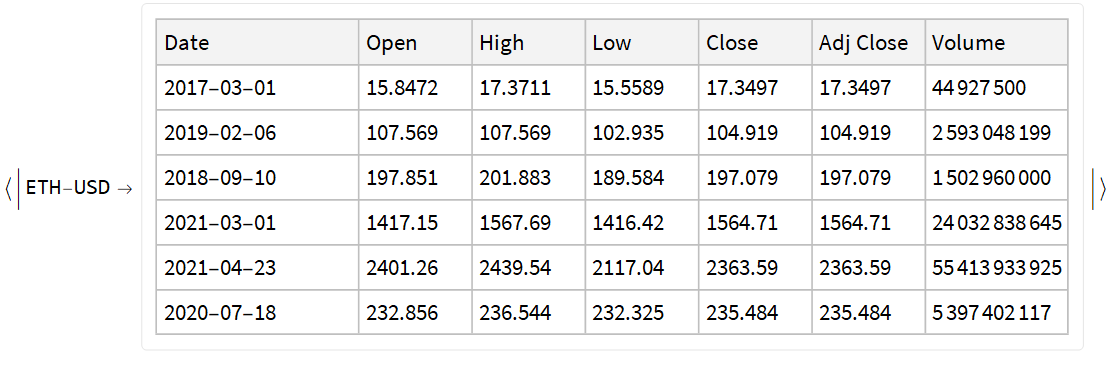
Check we good the data with random sample:
In[]:=
RandomSample[#,6]&/@KeyTake[aCryptoCurrenciesDataRaw,RandomChoice[Keys@aCryptoCurrenciesDataRaw]]
Out[]=
Here we add the crypto-currencies symbols and convert date strings into date objects.
In[]:=
AbsoluteTiming[aCryptoCurrenciesData=Association@KeyValueMap[Function[{k,v},k->v[All,Join[<|"Symbol"->k,"DateObject"->DateObject[#Date]|>,#]&]],aCryptoCurrenciesDataRaw];]
Out[]=
{8.27865,Null}
Summary
Summary
In this section we compute the summary over all datasets:
In[]:=
ResourceFunction["RecordsSummary"][Join@@Values[aCryptoCurrenciesData],"MaxTallies"->30]
Out[]=
,
,
,
,
,
,
,
,
1 Symbol | ||||||||||||||||||||||||||||||||||||||||||||||||||
|
2 DateObject | ||||||||||||
|
3 Date | ||||||||||||||||||||||||||||||||||||||||||||||||||||||||||||
|
4 Open | ||||||||||||||||||||||||||||||||||||||||||||||||||||||||||||
|
5 High | ||||||||||||||||||||||||||||||||||||||||||||||||||||||||||||
|
6 Low | ||||||||||||||||||||||||||||||||||||||||||||||||||||||||||||
|
7 Close | ||||||||||||||||||||||||||||||||||||||||||||||||||||||||||||
|
8 Adj Close | ||||||||||||||||||||||||||||||||||||||||||||||||||||||||||||
|
9 Volume | ||||||||||||||||||||||||||||||||||||||||||||||||||||||||||||
|
Plots
Plots
Here we plot the “Low” and “High” price time series for each crypto-currency for the last 120 days:
Here we plot the volume time series for each crypto-currency for the last 120 days:
data.bitcoinity.org
data.bitcoinity.org
Metadata
Metadata
In this sub-section we assign different metadata elements used in data.bitcoinity.org.
The currencies and exchanges we obtained by examining the output of:
In[]:=
Import["https://data.bitcoinity.org/markets/price/30d/USD?t=l", "Plaintext"]
Assignments
Assignments
Getting BTC data
Getting BTC data
Here we make a template string that for CSV data retrieval from data.bitcoinity.org:
Here is an association with default values for the string template above:
Remark: The metadata assigned above is used to form valid queries for the query string template.
Remark: Not all combinations of parameters are “fully respected” by data.bitcoinity.org. For example, if a data request is with time granularity that is too fine over a large time span, then the returned data is with coarser granularity.
Price for a particular currency and exchange pair
Price for a particular currency and exchange pair
Here we retrieve data by overwriting the parameters for currency, time unit, time span, and exchange:
Here is a summary:
Volume data
Volume data
Here we retrieve data by overwriting the parameters for data type, time unit, time span, and exchange:
Here is a summary:
Plots
Plots
Price data
Price data
Here we extract the non-time columns in the tabular price data obtained above and plot the corresponding time series:
Volume data
Volume data
Here we extract the non-time columns (corresponding to exchanges) in the tabular volume data obtained above and plot the corresponding time series:
References
References
[DBO1] https://data.bitcoinity.org.