The Wolfram Emerging Leaders Program: High School (WELP:HS) is a remote, semester-long program designed for exceptional graduates from the Wolfram High School Summer Research Program to continue to develop their skills. Students work in a small group over the course of a semester to do either a research-based project or a product development–based project under the guidance of expert mentors. Projects are centered around a topic at the intersection of the group’s interests.
This essay was written by:
This essay was written by:
Abstract
Abstract
This project consists of finding locations on Mars where it would be ideal to settle. We do this by comparing the flatness of Mars to that of a given city, and using that to find where on Mars it would be ideal to terraform. We could then use this data as well as topographical data of the city to predict what we should terraform.
Introduction
Introduction
The landscape of Mars is unlike that of Earth’s in many significant ways. However, the two do share specific, measurable similarities, such as elevation data and geological features. These characteristics can be utilized to analyze regions on Earth and locate comparable regions on Mars. The ultimate goal is to pinpoint locations on Mars where terraforming efforts would be theoretically the least costly, drawing inspiration from given Earth locations.
Analyzing elevation data
Analyzing elevation data
The first phase of this project involves an in-depth analysis of Mars’s elevation data. We first created a map that represents the difference in elevation at any given coordinate point on Mars, analogous to the derivative’s instantaneous slope, meaning we are able to make all comparisons between the elevation data on Earth and Mars relative. This is important in order to execute an accurate comparison, as taking into account only absolute elevation data (e.g., taking the sea level of a city and finding the most numerically similar location on Mars) is problematic, as with scale this method deteriorates rapidly. With this alternative approach, we are able to better optimize our model to identify regions on Mars while considering the topographical nuances of the surface of Mars. Additionally, by making our model’s comparisons relative to each planet, selected regions are significantly more economically feasible to terraform.
Gather data
Gather data
We want to use an Equirectangular projection for the image of Mars because we want to maintain consistency in scale throughout the entire image.
We first extract the elevation data of Mars using GeoElevationData.
In[]:=
marsElevationData = GeoElevationData[GeoRange->{{-90,90},{-180,180}},GeoModel->"Mars",GeoProjection->"Equirectangular"]
Out[]=
QuantityArray


As you can see, it returns a QuantityArray, which is incredibly hard to understand. Our solution to this is to visualize it using a ReliefPlot, allowing us to more easily recognize patterns.
In[]:=
ReliefPlot[marsElevationData,DataReversed->True]
Out[]=
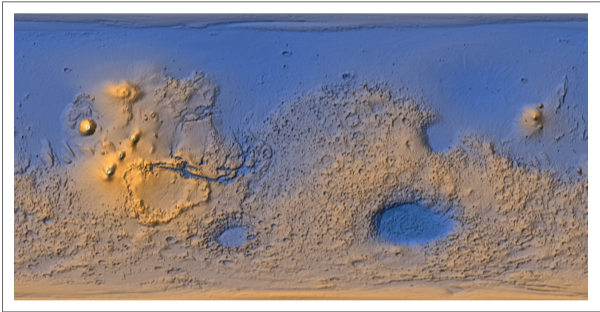
With this data, we are able to use the RangeFilter function to represent each point on Mars as the difference in elevation of its neighbors. This allows us to standardize the data to the planet, so when we search for similarities to locations on Earth we are not searching for an absolute match, but rather a more similar, less costly region to terraform. The data is declared here because it will not change throughout the course of our analysis.
In[]:=
$marsInfo=RangeFilter[marsElevationData,2];
A visualization of the updated elevation map:
In[]:=
differenceInMarsElevation=ReliefPlot[$marsInfo,DataReversed->True]
Out[]=
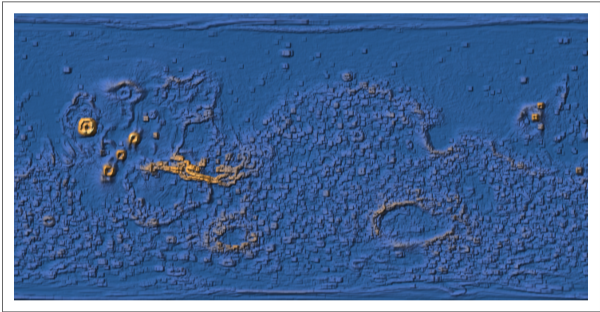
Now we’re ready to compare Mars with regions of the Earth.
Perform comparisons with Earth regions
Perform comparisons with Earth regions
Create a function to compare Earth and Mars elevation data. We use data-to-image analysis for these comparisons for efficiency, as in this case working with raw data requires an immense amount of computational power. Even so, the accuracy of our model doesn’t experience a significant decrease due to the fact that image comparison is just the same as normal data comparison, but there are more builtin functions and such to help with images. We’ll want to use the Mercator projection for individual cities so we can maintain accuracy on a smaller scale.
The first thing we want to do is get the ReliefPlot of the standardized elevation data of a given city in a given radius. Because we don’t want to continuously generate ReliefPlots of Mars, we also declare it here for later use
In[]:=
city=;radius=50;unit="Kilometer";differenceInEarthLocationElevation=ReliefPlot[RangeFilter[GeoElevationData[GeoRange->Quantity[radius,unit],GeoCenter->city,GeoProjection->"Mercator"],2],DataReversed->True]
Out[]=
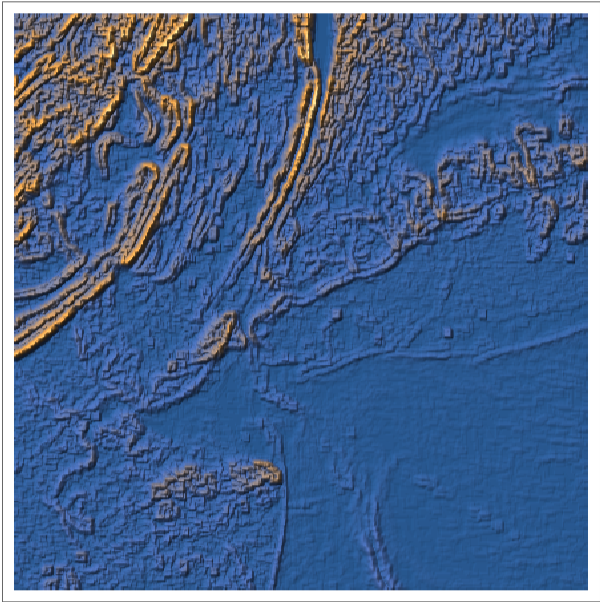
As you can see, this is nearly identical to what we did with Mars’ elevation data earlier.
Because the Mars and city elevation images have somewhat similar sizes, but cover entirely different areas---Mars covers a roughly 21340km x 10670km portion/the entirety of Mars’ surface area, while the city image covers a roughly 2*radius+1 km x 2*radius+1 km image of the Earth centered around a specific city---we need to either shrink the city image significantly(which is impossible to do reliably as it would probably be shrunk to less than 1 pixel) or increase the size of the Mars image significantly. Because the latter is the only reasonable solution to this problem, we will have to shrink the Earth image to decrease precision slightly at the cost of significantly reducing processing time.
Declaring the aforementioned precision constant as 'c'.
In[]:=
c=10;differenceInEarthLocationElevation=Echo[ImageResize[differenceInEarthLocationElevation,ImageDimensions[differenceInEarthLocationElevation]/c,Resampling->"Linear"],"Image of City: "<>city["Name"]];
»

To get the scale of the Earth in pixels per km, we can just divide the size of the image by the area covered(which is 2 * radius + 1). Using the size of Mars, we can figure out to what size we need to enlarge the Mars image by multiplying Mars’s equirectangular “dimensions”---21340km x 10670km---by the city’s scale (pixels per square kilometer).
In[]:=
earthScale=ImageDimensions[differenceInEarthLocationElevation]/(2*radius+1);(*pixelspersqkm*)marsSize={21340,10670};(*sqkm*){widthScale,heightScale}=earthScale*marsSize;(*pixels*)Echo[{widthScale,heightScale},"Mars Image Size: "];differenceInMarsElevation=ImageResize[differenceInMarsElevation,Round/@{widthScale,heightScale},Resampling->"Linear"];(*Iwouldechothisbutitwouldbemassiveanddoesn'tshowanythingspecial*)
»
Mars Image Size: ,
1280400
101
640200
101
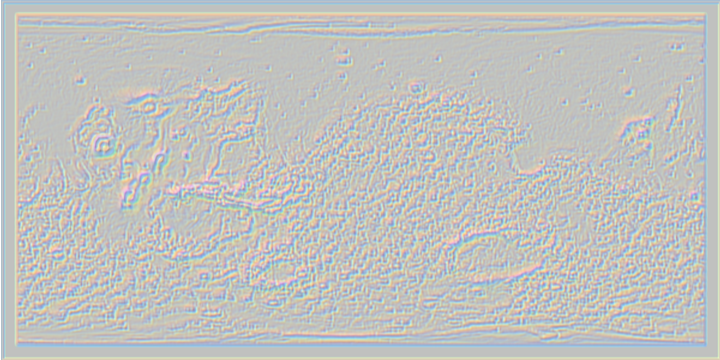
Now that we have scaled down the Earth and Mars images, we can start trying to find locations of Mars that are similar to the city we chose. Because we’ve stored all of our data in the form of images, rather than coding some complicated 2d subarray algorithm, we can simply use ImageCorrelate to locate the regions on Mars most similar to that of our city.
Finding similar regions to the city using ImageCorrelate:
In[]:=
corr=ImageCorrelate[differenceInMarsElevation,differenceInEarthLocationElevation,NormalizedSquaredEuclideanDistance,Padding->1000];corr;(*Don'techothis.Ascoolasitlooksitismassive*)ImageAdjust@ImageResize[corr,{720,360}](*an'approximation'ofcorr*)
Out[]=
Adjusting the image with ImageAdjust to maintain consistency:
In[]:=
corr=ImageAdjust[corr];
The color of each pixel represents how similar a given 2 * radius + 1 by 2 * radius + 1 portion of Mars is close to the city we chose. To find the point on Mars that is most similar to our city, we can use PixelValuePositions, trying to find the pixel most similar to the “Min” value.
Here, we increment the threshold by 0.005 so that we limit the amount of pixels we find. Changing the value used to increment n will increase precision at the cost of speed.
In[]:=
n=0;min=PixelValuePositions[corr,"Min",n];While[min=={},n+=0.005;min=PixelValuePositions[corr,"Min",n];];Echo[n,"Relative Precision: "];(*nisthedistanceoftheminimumpixelvaluefromthe"Min"pixelvalue*)
»
Relative Precision: 0.075
To get our final result, we want to take a part of the mars image at the coordinates we calculated.
In[]:=
ret={};dim=ImageDimensions[differenceInEarthLocationElevation];min=DeleteDuplicates[min];(*justincasethereareanyduplicates*)AppendTo[ret,ImageTrim[differenceInMarsElevation,Polygon[{{#[[1]]-dim[[1]]/2,#[[2]]-dim[[2]]/2},{#[[1]]-dim[[1]]/2,#[[2]]+dim[[2]]/2},{#[[1]]+dim[[1]]/2,#[[2]]+dim[[2]]/2},{#[[1]]+dim[[1]]/2,#[[2]]-dim[[2]]/2}}]]]&/@min;ret
As you can see these images are completely useless. We have no idea whether or not they’re similar enough to our original image because of their ridiculously low resolutions. However, we still have the coordinates of the of the similar regions, meaning we can get a higher-resolution image by simply getting the GeoElevationData of mars at that position using a GeoRange of 2 * radius + 1.
But first, we should put it all into a single function.
Scale the range of the map to the desired set of values. **https://www.arduino.cc/reference/en/language/functions/math/map/ **
Retrieves the map' s coordinates from mapNum and converts them into numeric form .
Retrieves the map' s coordinates from mapNum and converts them into numeric form .
Visualizing the Processed Data
Visualizing the Processed Data
Now that we have our helper functions, we can start actually processing the data
Getting a specific image using the coordinates obtained from compareWithMars
As you can see, the actual mars image is miles better than what we originally generated.
Greater values of k would reduce precision and generally increase the number of outcomes; larger radii would increase precision in the same way greater values of k do, but decrease precision because they would dilute the significance of the city’s elevation data by including factors that may not be part of the city (or even part of the same country in some cases).
Now let's organize that code into a single function to allow easy analysis of elevation data for a given city with a given k value of precision.
We’ve done NYC, a relatively flat city adjacent to several rivers and an ocean, so now let’s do Jerusalem, an hilly city, but we’ll decrease the radius(because it’s a smaller city), and increase the precision constant to make sure that it doesn’t take too much processing power.
Now let’s run it on Phoenix, an incredibly flat city. Phoenix is the largest city in the USA, so I can increase the radius and then decrease the precision constant to increase overall precision significantly
We’ve done a visualization of the specific regions of Mars, now let’s put it all into context by visualizing all of the coordinates on a globe simultaneously.
Extract the Mars regions identified as similar:
Extract the Mars regions identified as similar:
In a function for easier use:
Display Mars regions correlated to New York City:
This single test case shows how the parameters are incredibly important. Here, a larger radius and smaller precision constant greatly changed the location of the Mars image.
Organizing similar Mars regions
Organizing similar Mars regions
Organize the list of Mars coordinates into lists of similar numbers
Visualization of the resulting Mars regions:
Assemble the previous methods to perform a complete comparison for a city on Earth and map it to regions on Mars.
Some examples of this function being run:
Comparing and Predicting Topographical Features
Comparing and Predicting Topographical Features
Our first step is to obtain a list of large city entities that we wish to use to train the model.
Now create a method that takes a city as input and locates all nearby geological landmarks using the GeoEntities function. Because rivers aren’t GeoEntities, this function won’t return rivers.
Extracting features to prepare for ML model training
The next step would be to train a machine learning model by giving it a list of entities, like the one just generated, as well as their distance to the city, the city’s GDP per capita compared to its country’s GDP per capita, the city’s cost of living, its homeless rate, etc. as well as its geographic data, and then give the predictor geographic data like that obtained earlier, having it output a list of entities and their distance to the city, which shows what we should terraform on Mars.
Conclusion
Conclusion
Overall, this project was successful in its goal of analyzing locations on Earth to find similar, corresponding regions on Mars, optimized for terraforming cost. Elevation data proved to be an accurate indicator of relative similarity when comparing locations from the two planets. With this model, if one were to terraform the landscape of Mars to resemble that of Earth’s, their cost to do so would be theoretically the least costly.
Problems
Problems
First of all, there’s the obvious problems of precision: How do we know what precision constant should we use? How do we know what radius to use? The answer to those questions is: you test it over and over again until you get reasonable results. Not only can you compare the output data with the input data to find how inconsistent it is on average, but, as humans, we can easily recognize patterns that allow us to more easily fine-tune our parameters.
Another significant problem has to do with the ImageCorrelate use itself---because we use ImageCorrelate rather than an algorithm that we would code ourselves, it ignores what happens past the edges of the image. Remember, Mars is not flat! That means that you can’t ignore the possibility of a valid location being on the edge of the image, meaning that half of the output would be on one side of the image while the other half is on the other side of the image.
A possibly even more significant problem is the fact that our elevation data needs to be normalized even after we RangeFilter it. The Phoenix vs Jerusalem comparison from earlier shows this effectively as the RangeFiltered Phoenix has a range twice as large as that of RangeFiltered Jerusalem, but because the colors of a ReliefPlot are dependent on the range of the data its given, those two cities ended up looking relatively similar in flatness when in actuality one is twice as flat as the other. There is a fairly easy solution to this, adjust the colors of both cities’ ReliefPlot such that they accurately reflect the cities’ flatness in comparison to Mars’. Early on in the project, we actually got this to work, with the only caveat being that because it took such an immense amount of processing, it could add up to 1 hour of processing time.
The final problem is the fact that we don’t care about the orientation of the city. We’re trying to find a place that has similar patterns, which don’t change depending on the rotation. For example, if we rotated the image of NYC by 45 degrees, we could end up finding a completely different part of Mars, and this part would be just as suitable as one that we found if we hadn’t rotated the image 45 degrees or if we rotated it 180 degrees or even flipped it.
Another significant problem has to do with the ImageCorrelate use itself---because we use ImageCorrelate rather than an algorithm that we would code ourselves, it ignores what happens past the edges of the image. Remember, Mars is not flat! That means that you can’t ignore the possibility of a valid location being on the edge of the image, meaning that half of the output would be on one side of the image while the other half is on the other side of the image.
A possibly even more significant problem is the fact that our elevation data needs to be normalized even after we RangeFilter it. The Phoenix vs Jerusalem comparison from earlier shows this effectively as the RangeFiltered Phoenix has a range twice as large as that of RangeFiltered Jerusalem, but because the colors of a ReliefPlot are dependent on the range of the data its given, those two cities ended up looking relatively similar in flatness when in actuality one is twice as flat as the other. There is a fairly easy solution to this, adjust the colors of both cities’ ReliefPlot such that they accurately reflect the cities’ flatness in comparison to Mars’. Early on in the project, we actually got this to work, with the only caveat being that because it took such an immense amount of processing, it could add up to 1 hour of processing time.
The final problem is the fact that we don’t care about the orientation of the city. We’re trying to find a place that has similar patterns, which don’t change depending on the rotation. For example, if we rotated the image of NYC by 45 degrees, we could end up finding a completely different part of Mars, and this part would be just as suitable as one that we found if we hadn’t rotated the image 45 degrees or if we rotated it 180 degrees or even flipped it.
Future research
Future research
A next step for this project would be to utilize the power of machine learning to compare geological landmarks on Earth and Mars. By employing these techniques we aimed to observe patterns throughout different features of the two planets. With features that show similarities between the two planets, our model would then facilitate the identification of comparable regions from each planet. This computational approach would enhance our ability to locate areas on Mars that share geological traits with specific Earth locations, which would contribute confidence in our model’s accuracy in finding potential opportunities for terraforming on the surface of Mars. Additionally, this could allow us to find out where specifically we would need to terraform and what we would need to terraform it into.
Acknowledgements
Acknowledgements
We would like to thank our mentor, Henry Gustafson, for helping us and guiding us throughout the project. We’d also like to thank the WELP program for giving us the opportunity to conduct meaningful research.
CITE THIS NOTEBOOK
CITE THIS NOTEBOOK
Analyzing Topographical and Elevation Data to Find an Optimized Settlement Location on Mars
by Wolfram Emerging Leaders Program
Wolfram Community, STAFF PICKS, January 2, 2024
https://community.wolfram.com/groups/-/m/t/3094952
by Wolfram Emerging Leaders Program
Wolfram Community, STAFF PICKS, January 2, 2024
https://community.wolfram.com/groups/-/m/t/3094952